How to Set Up a Telehealth Consultation Room: Equipment Checklist for 2026
Why Your Room Setup Determines Clinical Quality
A poorly equipped telehealth room is not just inconvenient — it limits what your clinicians can actually do. If the remote doctor cannot hear the patient's heart sounds, cannot see a 12-lead ECG in real time, or has to wait while a nurse manually re-enters vitals between tools, the consultation is clinically incomplete.
That gap between a video call and a real clinical consultation comes down to equipment and workflow design. Getting both right from the start saves time, reduces risk, and means your patients receive the same standard of care remotely as they would in person.
This checklist covers everything you need for a functional, compliant telehealth consultation room in 2026 — whether you are equipping a single room in a nursing home, rolling out a multi-site primary care network, or deploying mobile units in the field.
The Core Equipment Checklist
Video and Audio Hardware
Clear, stable video and audio are the baseline. Without them, nothing else works.
Display:
- At minimum, a 24-inch HD monitor for the on-site nurse or clinician
- A second screen or dedicated patient-facing display is strongly recommended
- Wall-mounted or cart-mounted depending on your room layout
Camera:
- A 1080p or higher webcam with autofocus
- Wide-angle lens if the examination area requires the remote doctor to see patient positioning clearly
- Avoid consumer-grade laptop cameras for clinical use
Microphone and speakers:
- An echo-cancelling microphone — tabletop or integrated into the camera unit
- Directional speakers that do not pick up ambient noise from adjacent rooms
- A headset option for the clinician if the room has poor acoustic isolation
Lighting:
- Consistent, neutral lighting on the patient's face and examination area
- Avoid windows directly behind the patient, which create silhouette problems
- A ring light or adjustable overhead lamp improves visual clarity significantly
Clinical Diagnostic Devices
This is where most setups fall short. A video connection alone does not give the remote doctor the clinical data they need to make decisions. You need devices that connect directly to the platform and stream data live.
Essential devices for a primary care telehealth room:
| Device | What It Provides | Integration Requirement |
|---|---|---|
| 12-lead ECG machine | Cardiac assessment | Auto-upload to patient file |
| Digital stethoscope | Auscultation (heart, lung, bowel sounds) | Live audio stream to remote doctor |
| Blood pressure monitor | Vitals baseline | Automatic data capture |
| Pulse oximeter | SpO2 and heart rate | Real-time display on both screens |
| Thermometer | Temperature | Logged directly to record |
| Otoscope | Ear and throat examination | Live video feed |
| Dermatoscope | Skin lesion assessment | High-resolution image capture |
The standard to aim for: the remote doctor sees and hears the examination as it happens, not in a report sent hours later. That requires devices natively integrated with your platform — not connected through separate apps or manual entry.
For cardiac assessment specifically, a 12-lead ECG that auto-uploads to the patient record within 5 seconds of completion eliminates a step that, in fragmented setups, often takes 15 to 20 minutes or gets skipped entirely.
Connectivity and Power Infrastructure
Unstable connectivity is the most common cause of failed telehealth consultations.
Internet:
- Minimum 10 Mbps upload and download per active consultation room
- Wired ethernet preferred over Wi-Fi for clinical rooms
- A backup 4G/LTE router for failover if your primary connection drops
- A separate network VLAN for clinical devices if your facility handles other traffic
Power:
- UPS (uninterruptible power supply) for the main workstation and connected devices
- Sufficient outlets for all devices without extension cable chains
- A cable management system to prevent trip hazards and equipment damage
For mobile or field deployments:
- A rugged backpack configuration with battery-powered devices
- 4G/5G connectivity as the primary connection
- A lightweight but clinically complete device set
Furniture and Room Layout
The physical environment affects both patient comfort and clinical workflow.
Examination area:
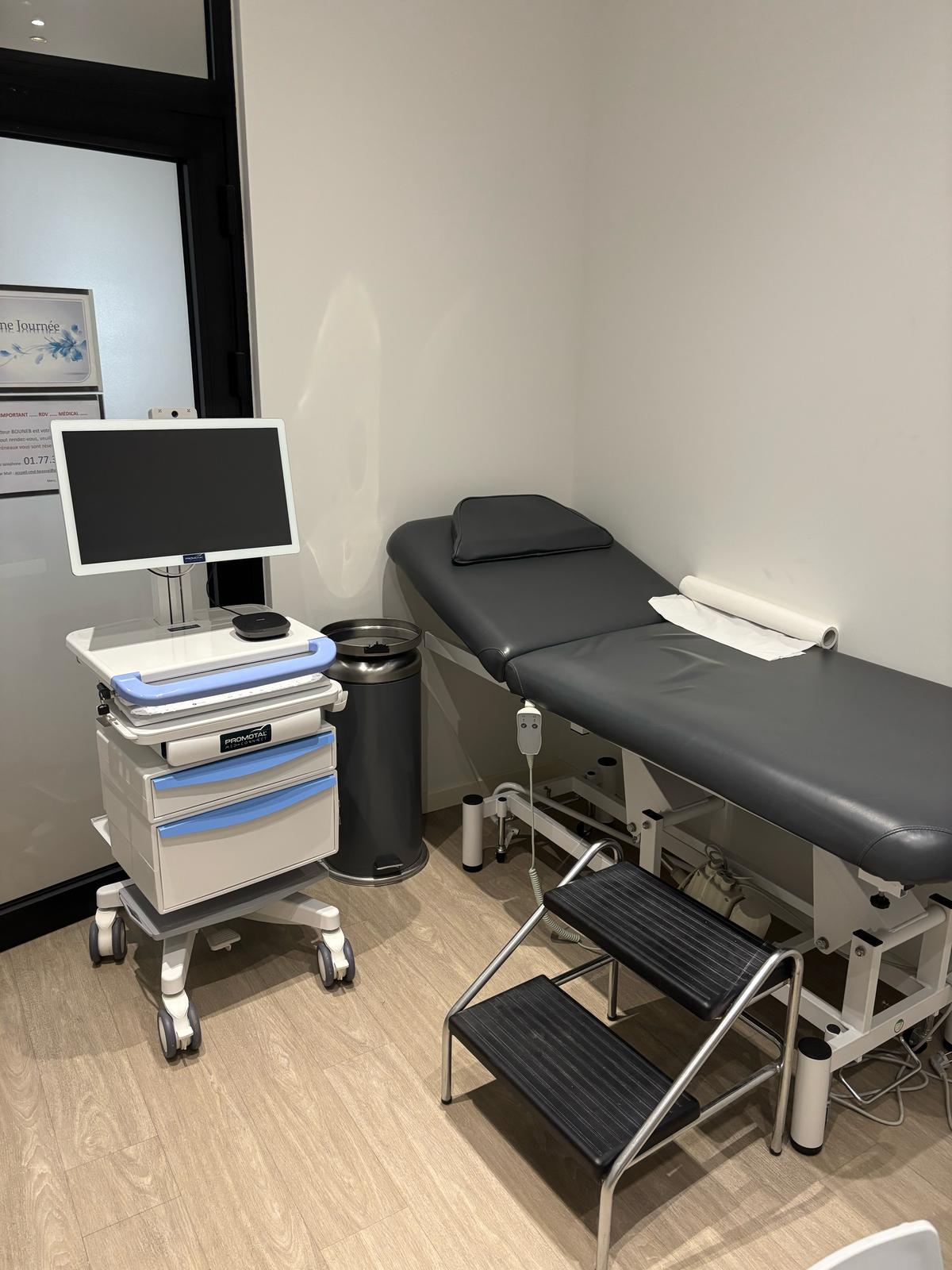
- A dedicated examination table or chair positioned within reach of all connected devices
- The camera should frame the patient clearly without the clinician needing to reposition it mid-consultation
- Enough space for the on-site nurse to move around the patient with devices
Workstation:
- A height-adjustable desk or cart allows the clinician to stand or sit as needed
- All device cables should reach the workstation without creating hazards
- The screen should be visible to both the clinician and, where appropriate, the patient
Privacy:
- A door that closes fully, with a visual indicator when a consultation is in progress
- Acoustic treatment if the room shares walls with waiting areas
- Blinds or frosted glass on any windows visible from public areas
Software and Platform Requirements
The equipment is only as useful as the software connecting it. A common mistake is investing in good hardware and then running it through a generic video call platform that cannot receive device data.
Your platform needs to handle:
- Live device data streaming during the consultation, not just after
- Automatic upload of clinical data — ECG, vitals, images — directly to the patient record
- AI-assisted documentation to reduce post-consultation admin
- Specialist referral within the same interface, without switching tools
- Billing integration so the administrative step does not require a separate system
- Compliance certification appropriate to your jurisdiction (ISO 27001, HIPAA, GDPR)
Running four separate tools through a single consultation is not a workflow. It is a source of errors, delays, and documentation gaps.
Promotal MedConnect is built specifically to address this. The platform handles video, connected device data, patient records, AI SOAP note generation, billing, and specialist referral from one screen. Your ECG data is in the patient file before the consultation ends. Your teams do not switch apps mid-examination.
Compliance and Data Security Considerations
If you are setting up a telehealth room in France, the EU, the Middle East, or any regulated environment, compliance is not optional.
What to verify before going live:
- Data residency: Where is patient data stored? EU data should stay in EU data centers. Confirm this in writing with your platform provider.
- Encryption standards: TLS 1.3 and AES-256 are the current benchmarks for data in transit and at rest.
- Certifications: ISO 27001:2022 and HIPAA compliance are the primary markers of enterprise-grade security.
- On-premise option: If your organization operates under data sovereignty requirements, confirm whether your platform supports full on-premise deployment.
- Access controls: Role-based access so nurses, doctors, and administrators each see only what they need.
- Audit logs: Full traceability of who accessed which patient records and when.
For French healthcare organizations, GDPR compliance and HDS (Hébergeur de Données de Santé) certification are also relevant. Verify both with your platform and hosting provider before deployment.
Choosing the Right Hardware Configuration for Your Setting
Not every telehealth room looks the same. The right configuration depends on your care setting.
Fixed consultation room (nursing home, primary care center): A cart-based setup works well here. The cart holds the monitor, camera, and connected devices in a stable, mobile unit that can be repositioned within the room. It connects to the platform via ethernet and provides a consistent clinical environment for daily use.
Mobile or home visit setting: A medical kit or backpack configuration gives your nurses clinical-grade devices in a portable format — the same platform connection, the same data upload, the same documentation workflow, without the fixed room. This is particularly relevant for nurses conducting home visits or for mobile clinics serving rural and underserved areas.
Multi-site network: If you are equipping 10 or 20 sites, standardization matters. Every site running the same hardware and the same platform means clinical staff can move between locations without relearning tools, and your operations team has one system to manage.
You can review the full range of telehealth equipment configurations to compare options for your specific context.
Common Setup Mistakes to Avoid
Buying hardware before choosing a platform. Devices that do not integrate with your platform become manual data entry tasks. Choose your platform first, then select compatible hardware.
Underestimating connectivity requirements. A single consultation room on a shared office network causes problems more often than not. Allocate dedicated bandwidth.
Skipping acoustic treatment. Poor audio quality is the most common complaint from remote doctors — and one of the cheapest problems to fix before go-live.
No backup connectivity. A failed internet connection during a consultation is a clinical risk. A 4G failover router costs far less than the consequences of a dropped consultation at the wrong moment.
Treating documentation as an afterthought. If your platform does not auto-generate SOAP notes or integrate with your patient record system, your clinicians will spend as much time on admin after each consultation as they did on the consultation itself. That is not sustainable at scale.
Ignoring staff training time. Even a well-designed platform needs a structured onboarding process. Budget time for this before your go-live date.
FAQs
What is the minimum internet speed required for a telehealth consultation room? Plan for at least 10 Mbps upload and download per active consultation room. For rooms using multiple connected devices streaming data simultaneously, 25 Mbps or higher is more reliable. A wired ethernet connection is strongly preferred over Wi-Fi for clinical use.
Which diagnostic devices are essential for a telehealth room in primary care? At minimum: a 12-lead ECG machine, digital stethoscope, blood pressure monitor, pulse oximeter, and thermometer. For broader clinical coverage, add an otoscope and dermatoscope. The critical requirement is that these devices connect directly to your platform and stream data live to the remote doctor — not through manual entry.
How long does it take to set up a telehealth consultation room? Physical setup of the room, equipment, and connectivity typically takes one to three days. Platform deployment and staff training add time depending on the provider. With MedConnect, full deployment is achievable in 2 to 4 weeks from contract to live consultations.
What compliance certifications should a telehealth platform have? For most clinical settings, ISO 27001:2022 and HIPAA compliance are the baseline. EU-based organizations should also verify GDPR compliance and, for French healthcare providers specifically, HDS certification for data hosting. Confirm data residency in writing before signing any contract.
Can a telehealth room be set up for mobile or field use? Yes. A backpack or medical kit configuration gives clinicians clinical-grade connected devices in a portable format — the same platform, the same data integration, the same documentation workflow, without a fixed room. This is well-suited for home visits, rural clinics, and mobile health programs.
How do I prevent patient data from being stored in the wrong jurisdiction? Choose a platform that offers regional data centers and confirms data residency contractually. Platforms with on-premise deployment options give you full control over where data is stored — which matters for organizations operating under data sovereignty requirements.
What is the difference between a telehealth platform and a video call tool for clinical use? A video call tool provides a connection. A telehealth platform provides a complete clinical workflow: video, connected device data streaming, patient record integration, AI documentation, billing, and specialist referral. The practical difference is whether the remote doctor can make a clinical decision during the call — or only after receiving a follow-up report.
What to Do Next
A well-equipped telehealth consultation room is not a complex project. It is a series of deliberate decisions: the right devices, the right platform, the right infrastructure, and a clear deployment plan.
The gap between a setup that works and one that frustrates usually comes down to whether your hardware talks to your software — and whether your software handles the full clinical workflow rather than just the video connection.
If you are planning a setup for a primary care network, nursing home, or mobile clinical service, the solutions pages at Promotal MedConnect cover specific configurations by care setting. You can also review pricing or request a demo to see the full workflow in practice.
Learn more at promotal-medconnect.com.
Ready to discover MedConnect?
Request a personalized demo and see how the platform adapts to your practice.
Request a demo