
Telemedicine Platform Device Integration Guide: HL7, FHIR, GDT & Connected Diagnostics
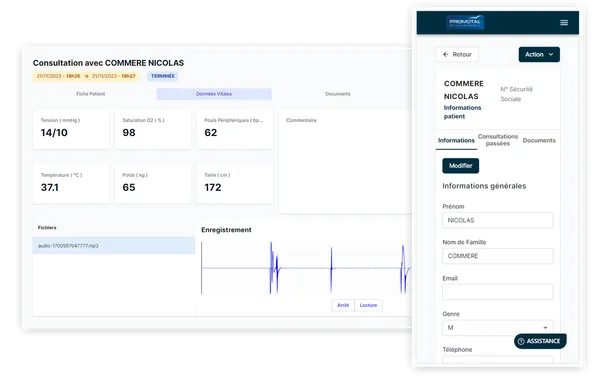
Medical device integration with a telemedicine platform means moving patient identity, the exam order, the result, and—when required—the live clinical stream between the device and consultation record without manual re-entry. HL7, FHIR, and GDT can structure parts of that exchange; Bluetooth Low Energy (BLE) and USB often carry data from the device. No protocol guarantees a complete workflow by itself. Buyers must verify patient-to-exam matching, error handling, the remote clinician's view, and retention in the record.
The integration path buyers should verify
A typical architecture follows this chain:
- The clinician selects the patient and exam in the platform.
- An adapter sends the required context to the device through GDT, HL7, BLE, or USB, depending on the model.
- The device captures the measurement or produces a clinical stream.
- The connector service receives and validates the result, then attaches it to the correct consultation.
- The remote clinician sees the stream or result in the working view, and the document is retained in the record.
That chain matters more than an “HL7 compatible” box on a sales sheet. One integration may transfer a PDF without structured measurements; another may show live data without retaining it. Define the expected outcome for each device before selecting the protocol.
HL7, FHIR, GDT, BLE, and USB: what does each one do?
| Technology | Common role | What to verify |
|---|---|---|
| HL7 v2 | Structured messages between clinical systems, including identity, orders, and observations | Version, message profiles, codes, and acknowledgements |
| FHIR | Exchange of clinical resources through modern web interfaces | Which resources, operations, and versions are actually supported |
| GDT | File exchange between medical software and a device, common in some diagnostic workflows | Folder monitoring, filenames, status, and duplicate handling |
| BLE | Short-range wireless connection between a device and consultation workstation | Pairing, permissions, reconnection, and range in the real environment |
| USB | Local connection for data, video, or peripherals | Drivers, available ports, security policy, and stability after updates |
BLE and USB do not replace HL7 or FHIR; they address a different layer of the problem. Likewise, “FHIR compatible” can describe an integration with a third-party system rather than a native FHIR server exposed by the platform. The contract and acceptance test should state that distinction.
Documented examples in the MedConnect ecosystem
The MedConnect telehealth platform uses different connection methods according to the device and clinical workflow:
- touchECG: GDT exchange prepopulates patient context; after acquisition, the connector monitors for the resulting PDF and adds it to the record.
- Edan SE-1515 ECG: documented support through GDT and Bluetooth, depending on configuration.
- MIR Spirobank II Smart spirometer: an HL7 v2 integration with documented QPD, PID, OBR, and OBX message families.
- Vital signs: wireless or BLE transfer depending on the device. FHIR R4 exchange is documented through the AIView integration; this does not mean MedConnect currently exposes a general-purpose native FHIR server.
- SMARTHO-D2 stethoscope: BLE and Web Bluetooth carry live auscultation audio.
- Exam cameras and ultrasound: USB or wireless video, depending on the device, provides a second stream to the remote clinician.
These examples explain why a multi-device platform needs an adaptation layer. The catalog can evolve, and exact compatibility must always be confirmed for the device model, firmware version, and deployment context. Contact the MedConnect integration team to scope the workflow.
Seven requirements for the integration specification
- Identity: define the patient identity source of truth and required fields.
- Initiation: state whether the exam starts in the platform, on the device, or both.
- Format: list the structured values, files, images, audio, and video required.
- Real time: separate the live stream from the result available after the exam.
- Errors: cover disconnection, duplicates, wrong-patient selection, incomplete files, and recovery.
- Auditability: retain author, time, device, version, and useful technical events.
- Acceptance: test every workflow end to end using the versions that will be deployed.
Security, hosting, and responsibility
The security boundary includes the device, local workstation, connector, network, platform, and destination system. Verify encryption in transit, access rights, logs, updates, secret management, retention, and hosting location. Projects handling health data should map those controls to the legal and contractual requirements in each market.
MedConnect documents HDS hosting, ISO 27001 certification, GDPR compliance, and an on-premise deployment option. Those controls do not remove the buyer's responsibility to define each party's role, permitted flows, and retention policy. The security and compliance overview describes the foundation to assess.
Acceptance test plan before deployment
- Create a test patient and confirm that the device receives the correct identity.
- Start, interrupt, and resume an exam.
- Check the result's units, dates, identifiers, and metadata.
- Simulate the loss of BLE, cable, network, or access to a monitored folder.
- Verify what the remote clinician sees live and what remains after the consultation.
- Confirm that a duplicate or orphan result is detectable and recoverable.
- Document the support procedure and compatible versions.
For an initial demonstration, choose two devices with different workflows—for example, a connected ECG that creates a document and an electronic stethoscope that transmits live audio. This tests both post-exam capture and real-time streaming instead of one idealized use case.
Frequently asked questions
What is the difference between HL7 and FHIR for medical device integration? HL7 v2 generally exchanges structured messages between systems, while FHIR organizes data as resources available through web interfaces. The best choice depends on installed systems and the required workflow, not only on which standard is newer.
Is GDT still useful in a telemedicine project? Yes, when a device or its software uses GDT to receive patient context and return a result. The implementation should test folder monitoring, status, duplicate handling, and attachment to the correct record.
Is a Bluetooth connection enough to call a device integrated? No. Bluetooth may carry data between the device and workstation, but the workflow must still identify the patient, present data to the clinician, handle errors, and retain the result.
Does MedConnect provide a native FHIR server? The documented FHIR R4 capability is delivered through the AIView integration. It should not be described as a general-purpose native MedConnect FHIR server. Validate any specific FHIR requirement resource by resource with the integration team.
What should buyers request in a vendor demonstration? Ask for an end-to-end scenario using your device model: patient selection, exam initiation, stream or result, a simulated error, attachment to the record, and the remote clinician's view.
To build a device-by-device integration matrix, explore the MedConnect platform and connected telehealth equipment, then request a demonstration based on your clinical workflow.
Ready to discover MedConnect?
Request a personalized demo and see how the platform adapts to your practice.
Request a demo